
Email is one of the most effective tools event directors have to promote events, engage participants, and build lasting communities. TicketSignup’s Email v2 system was built specifically to support event marketing at scale—while handling the complex technical details behind the scenes.
As we continue to improve our sending infrastructure and deliverability, we also want to help event directors understand how their email practices directly impact inbox placement, spam rates, and long-term sending privileges.
This guide explains how TicketSignup’s email system works, why spam rates matter, and what you can do to ensure your emails continue reaching participants’ inboxes.
A Powerful, Free Email Platform Built for Scale
TicketSignup sends over 700 million emails every year on behalf of events and organizations. That includes:
- Marketing emails
- Transactional emails
- Participant communications
- Operational and event-day messaging
And we provide this service free of charge to our customers.
Our email platform is designed to handle high volume while maintaining strong deliverability across major inbox providers like Gmail, Yahoo, and Outlook. You can learn more about the full feature set here:
TicketSignup Free Email Solution
Behind the scenes, we invest heavily in infrastructure, monitoring, and compliance so event directors can focus on running great events—not managing email servers.
Why TicketSignup Uses Shared Sending Domains
All email sent through TicketSignup is delivered from a small number of shared sending domains. This is intentional—and beneficial to our customers.
By centralizing email delivery, TicketSignup handles:
- Domain authentication (SPF, DKIM, DMARC)
- IP reputation management
- Feedback loops with mailbox providers
- Bounce handling and suppression
- Spam complaint monitoring
This enterprise-grade setup allows even small events to benefit from the same infrastructure used to deliver hundreds of millions of emails reliably. If you’re curious about the technical details, this article provides a deeper explanation:
Enterprise Email Delivery at TicketSignup
The tradeoff: because all customers share the same sending domain, poor email practices by a few senders can impact deliverability for everyone. That’s why developing good emailing practices is critical.
What Are Spam Traps? (and Why They Matter)
Spam traps are email addresses used by mailbox providers and anti-spam organizations to identify poor sending behavior. These addresses are not used by real people and are never meant to receive legitimate marketing email.
They often are derived from:
- Old, abandoned email accounts
- Addresses collected without proper consent
- Email addresses with typos
- Purchased or scraped email lists. (Spam trap email addresses are scattered across the internet, so scraped email lists almost always contain them)
TicketSignup actively works to detect and avoid spam traps to protect our sending reputation. However, the most common way senders hit spam traps is through custom list uploads or very old participant lists.
For most event directors, the key takeaway is simple:
If you email people who didn’t recently and explicitly engage with your event, you significantly increase the risk of spam issues.
How Event Directors Can Protect Deliverability
…and their account sending privileges.
1. Be Extremely Careful with Custom List Uploads
Custom lists are the highest-risk source of spam complaints and spam traps.
Best practices:
- Only upload lists where recipients explicitly opted in to receive email from your organization
- Use TicketSignup Email Capture to help build lists of interested recipients
- Avoid lists from sponsors, partners, or “shared” marketing databases
- Never upload purchased, rented, or scraped lists
- Email individuals, remove role-based emails such as (e.g. info@, admin@, support@)
If you can’t clearly explain when and how someone consented to receive your emails, they should not be on your list.
2. Avoid Using Very Old Participant Lists
Participant lists that are more than 2–3 years old are especially risky.
Why?
- People abandon email addresses over time
- Old addresses are more likely to become spam traps
- Recipients may no longer recognize your event and mark emails as spam
Best practice:
- Prioritize recent participants and registrants
- Gradually re-engage older audiences with smaller sends before emailing them at full scale
3. Send Relevant, Expected Content
Spam complaints often come from confused recipients, not malicious intent.
Ask yourself:
- Would the recipient reasonably expect this email?
- Does the subject clearly reflect the content?
- Is the friendly sender name recognizable?
- Does this activity violate the US Federal CAN-SPAM Act?
Emails that feel unexpected—even if technically opt-in—are far more likely to be marked as spam. Event directors must also take responsibility for ensuring their email practices adhere to legal requirements.
4. Be Mindful of Email Frequency
Even when recipients have opted in, sending too frequently can lead to email fatigue. Fatigued recipients are more likely to ignore messages—or mark them as spam—which negatively impacts deliverability for everyone.
- Avoid sending the same audience too many emails in a short period of time unless they are transactional and directly related to your event. No more than 1-2 marketing emails per week is a good rule of thumb.
- De-duplicate custom lists that may be reused across multiple campaigns
(TicketSignup automatically de-duplicates recipients within a single email, but repeated sends across campaigns can add up.) - Segment your audience so that only relevant recipients receive each message. (For example, do not market a Chicago based event to a list from your Philadelphia event.)
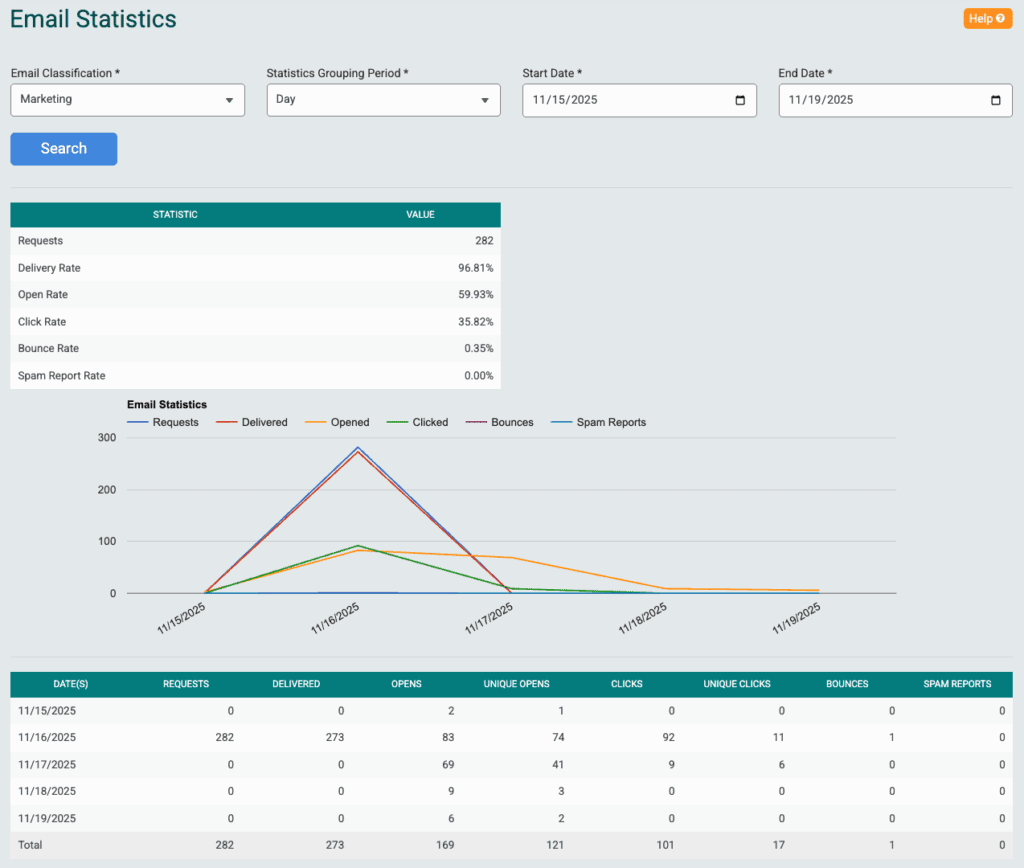
- Pause or reduce sending if engagement drops significantly. You can check engagement statistics by using TicketSignup Email Reports.
5. Respect Unsubscribes and Suppressions
TicketSignup automatically handles unsubscribes within your event, but problems arise when:
- Lists are downloaded from one event and uploaded to another without checking for unsubscribes.
If you are going to reuse an email list across events, unsubscribed recipients need to be removed first. Learn about the Unsubscribed Recipients Report.
6. Monitor Your Spam Rate and Warnings
Mailbox providers track spam complaints aggressively. Check your spam and bounce rates using Email v2 Email Reports. Even a very small percentage of complaints can cause delivery issues at scale.
TicketSignup is continuing to improve:
- Tools to help customers build high quality lists
- Spam monitoring
- Account-level reviews
- Warning systems for elevated spam rates
As part of this effort, accounts with consistently high spam rates may receive:
- Warnings
- Temporary sending limits
- In severe cases, account shutdowns to protect overall deliverability
This protects all customers using the platform.
We’re Investing in Deliverability—And We Need Your Help
TicketSignup is actively improving our email infrastructure, monitoring, and send rate optimization. Your role as an event director is important. Our goal is to help ensure that your emails reach inboxes instead of spam folders—today and long into the future.