
TicketSignup runs fraud screening on every transaction, and that standard protection covers most events. For sellouts and events facing fraud, organizers now have a stricter option for ticket fraud prevention: Strict Address Verification System (AVS).
When it’s on, checkout collects the buyer’s full billing address, and every card payment has to match the billing street address and ZIP code on file with the cardholder’s bank. If the address doesn’t match, the payment is declined before the ticket is sold.
What Is the Address Verification System (AVS)?
The Address Verification System (AVS) is a standard check that card networks and banks use to confirm a buyer’s identity. When someone pays by card, the billing address they enter is compared to the address the bank has on file.
Someone using a stolen card number often doesn’t know the cardholder’s exact billing address. Requiring a full match on both the street address and ZIP code makes it much harder to complete a purchase with stolen card details.
How Strict AVS Works on TicketSignup for Ticket Fraud Prevention
With Strict AVS on:
- Checkout asks every card buyer for their full billing address
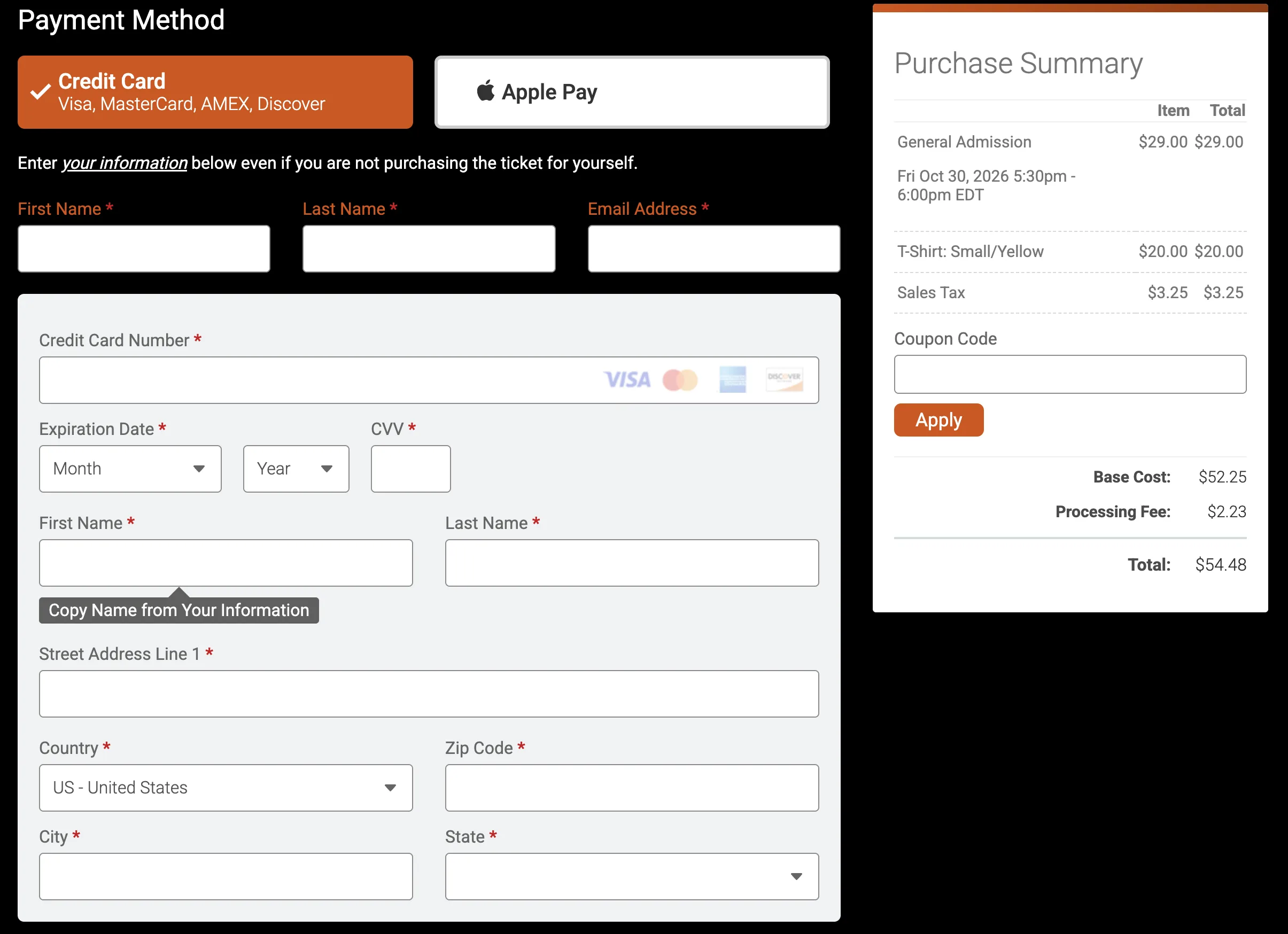
- The billing street address and ZIP code both have to match the bank’s records
- Payments that don’t match are declined at checkout
- The check runs on every card transaction for your event, including ticket purchases, store purchases and donations
- Apple Pay stays available. Apple Pay verifies the card when the buyer adds it to their Apple Pay wallet.
- You turn it on or off for each event, anytime, from your event dashboard
How Ticket Fraud Hurts Your Event
Fraudulent ticket purchases cost more than the ticket price:
- Chargebacks: when the real cardholder disputes the charge, the sale is reversed and the ticket revenue is gone.
- Lost inventory: fraudulent buyers can take capacity on your busiest dates, leaving fewer tickets for real guests.
- Card testing: fraudsters sometimes run small purchases to check whether stolen card numbers work. Each one creates refunds and cleanup for your team.
- Guest experience: tickets bought with stolen cards often end up resold to guests who learn at the gate that their ticket was canceled.
A full address match adds a strong barrier against these purchases.
Is Strict AVS Right for Your Event?
Strict AVS slows down every card purchase, so it isn’t a setting to turn on by default. The tradeoff is worth it when fraud risk is high:
- Sellouts and high-demand on-sales where tickets attract resellers using stolen cards
- Card testing: a run of small or repeated purchases from unfamiliar buyers
- Repeated chargebacks from cardholders who didn’t make the purchase
- Fraudulent purchases that show up as resold tickets or canceled orders
Turn it on for the events that need it, and turn it back off when the risk passes.
Know the Tradeoff
Strict AVS adds time and friction to checkout:
- Every card buyer enters a full billing address
- Buyers whose street address or ZIP code doesn’t exactly match their bank’s records are declined, such as an old address after a move or a missing apartment number
- Declined buyers need to try again, and some real buyers may give up
If you turn it on, add a short note to your event details or checkout instructions reminding buyers to use the billing address their bank has on file. Buyers with Apple Pay can also check out with it.
How to Turn On Strict AVS
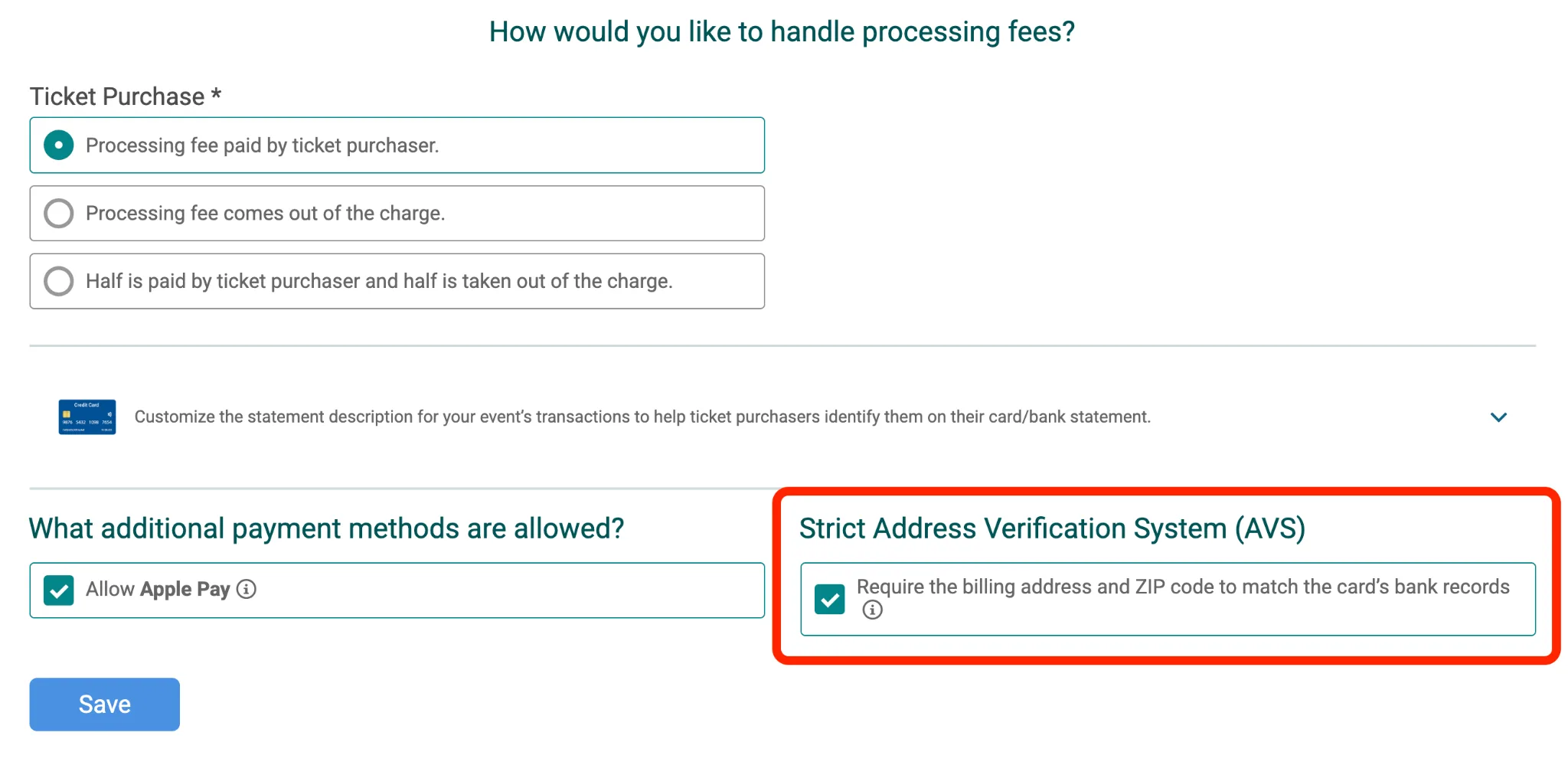
- Go Financial >> Payment Settings
- Under Strict Address Verification System (AVS), check Require the billing address and ZIP code to match the card’s bank records
- Save
You must have access to your event’s payment settings to turn it on or off. This setting is only available from the dashboard page, so you can enable it after completing the Ticket Wizard.
Strict AVS FAQ
Does my event need Strict AVS? Most TicketSignup events don’t. Standard fraud screening runs on every transaction. Strict AVS is worth the slower checkout for sellouts and events facing fraud, such as card testing or repeated chargebacks. Learn more about payment fraud from Adyen.
Is Strict AVS on by default? No. TicketSignup Strict AVS is off until an event organizer turns it on in Payment Settings.
Does Strict AVS slow down checkout? Yes. TicketSignup checkout requires a full billing address when Strict AVS is on, and buyers whose address doesn’t exactly match their bank’s records are declined and need to try again. That being said, many people have both their credit card and billing address saved on browsers, which auto-populates the required fields.
What happens when a buyer’s address doesn’t match? TicketSignup declines the payment, and the buyer can try again with the billing address their bank has on file.
Can buyers still use Apple Pay? Yes. Apple Pay stays available with TicketSignup Strict AVS on. Apple Pay verifies the card when the buyer adds it to their Apple Pay wallet.
Does it apply to store items and donations? Yes. When Strict AVS is on, it applies to every card transaction on the TicketSignup event, including tickets, store items and donations.
Does it cost extra? No. Strict AVS is included with TicketSignup at no extra fee.
Can I turn it off later? Yes. Organizers can turn Strict AVS on or off anytime from Payment Settings in the TicketSignup event dashboard.
Does TicketSignup still run its standard fraud screening? Yes. Strict AVS adds to the fraud screening that already runs on every TicketSignup transaction.
Extra Protection When the Stakes Are High
TicketSignup’s standard fraud screening protects every event. When you have a sellout on the calendar or fraud shows up at your event, Strict AVS gives you a stricter option you control and can turn off anytime.
Questions about ticket fraud prevention? Reach out to our support team at info@ticketsignup.io or schedule a demo to see how TicketSignup protects your revenue.