
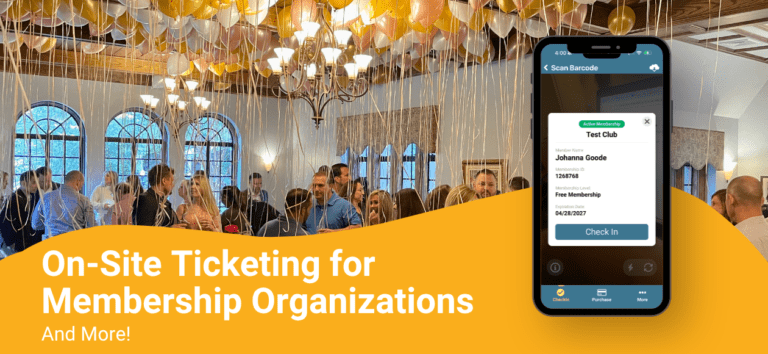
April updates to the TicketSignup Tickets App are here, and there are some big upgrades for event directors.
On-Site Ticketing for Members
Membership organizations that run ticketed events with free entry for members have traditionally had to manage their member lists separately from their ticketing. That usually means exporting a member database, importing it into the event, or asking every member to pre-register online before they show up. It works, but it’s a lot of manual effort for something that should be simple.
This update to the Tickets app for check-in allows for on-site ticketing for members, eliminating that workflow entirely.
Create Tickets for Members at the Door
Organizations can now set up a ticketed event and issue tickets to valid members on site. When a member arrives, the check-in operator scans their membership QR code. The app verifies their membership, displays their details, and lets the operator create a ticket right there. No pre-registration. No database exports. No import steps. The member walks up, gets scanned, and gets in.
This is especially useful for organizations running recurring events where the member roster is already established but attendee lists change week to week. Instead of managing registration ahead of time, you handle it at the door in seconds. You’ll find the option to add Membership Tickets in the TicketSignup Tickets app Configuration Setup for simple ticket events. Simply enable it to start creating tickets (and checking in members) from the Membership QR code.

The basic steps of on-site tickets for members are simple:
- Host Membership: Members sign up with your organization via your Membership Organization.
- Create a Simple Ticket Event: Use TicketSignup’s Simple Ticket Events to create your events. These can be members-only events with free entry, or public events that are free for members.
- Scan Membership QR Codes: When members arrive at the event, they simply pull up their Membership QR code.
- Automatically Create “Ticket”: Using the TicketSignup Tickets app, scan the Membership QR. This instantly creates a ticket and checks in the member (I.E. a record of attendance)!
- Use Your Data: Your membership organization can then use the ticket purchase report to track accurate numbers for each member event, plan future staffing needs, verify the attendance of specific members. You can even use the reports from all runs to determine identify engaged members (and those who may need more inspiration to get involved).
Use Cases: How Membership Organizations Can Use On-Site Tickets for Members
How can a membership organization use on-site tickets for members? The options are endless, but to get you started, a few examples are below.
Easy Member Perks
Provide perks (like parking) to members for free, when the general public pays for them? Enable ticket sales for parking passes, and then allow members to simply park free, which creating a record that they used their perk.
Regular Association Meet-Ups
Host weekly or monthly meetups for members of your professional association. While meet-ups are free, creating on-site member tickets allows you to track attendance, tweak frequency, and understand who your most motivated members are.
Staff Your Special Events
Offer educational programs and organized walks at your garden, free for members? Understanding attendance is key for you to correctly staff your events and provide appropriate programming. Keeping your data online (and not on a clipboard) makes it quick and easy to analyze demand and adjust schedules.
Manage Waivers for Members
Provide community fitness classes that are free, but require a signed waiver? Use Memberships to create your program (and require your waiver), then use on-site tickets for members to sign people in. You can verify the waiver has been signed by each person in real-time; no need to require your regulars to sign a new waiver each week.
Additional Updates to the TicketSignup Tickets App
While on-site member tickets is the big news for the TicketSignup Tickets App, it’s not the only upgrade. We have more improvements to make your on-site operations even easier.
Print Label Customization
Operators now have control over how printed labels are laid out. You can adjust font sizes and reposition individual elements on the label to match your event’s needs. Set it up once and every label prints exactly the way you want.
We’ve also added a faster printing option for Brother printers, which cuts down on wait times at high-volume check-in stations.
Additional Improvements
- Configurable sync speed. You can now control how frequently the app syncs with the server. Speed it up for real-time accuracy during peak check-in or slow it down when bandwidth is limited.
- Hide event stats. A new configuration option lets you hide the event stats screen entirely for operators who don’t need it.
- iPad layout fix for iOS 26. Resolved a resizing issue that affected iPad layouts on iOS 26.
- Persistent filter header. The header that provides access to check-in filters now stays visible, so operators don’t lose access mid-session.
- External barcode scanner fix. Fixed a bug where external barcode scanners were submitting before the full barcode was read.
Under the Hood
A few infrastructure updates that won’t change your day-to-day experience but keep things running smoothly: we’ve added support for over-the-air updates so patches can go out faster, cleaned up error reporting to reduce noise, updated the Square SDK to v2.4.0, and swapped to a better-maintained safe area view package.