

TicketSignup connects every transaction, fee, refund, chargeback, adjustment, and payout in one place making it easy to track every ticket dollar from sale to bank deposit. Open any number on your dashboard and see exactly what is behind it. With TicketSignup, there are fewer Excel formulas and faster answers your treasurer, CFO, and accountant can verify.
See TicketSignup’s Ticket Event Financial Reporting in Action
One ledger, not two reports that have to agree
This works because of how TicketSignup is built. We are a PCI Level 1 payment facilitator, so the system that sells the ticket is the same system that moves the money. Your sales data and your payment data are one record, not two that have to be matched up.
Every row in your Financial Summary is a live link into the transactions behind it. The summary and the detail are the same data, so your roll-up and your line items cannot disagree.
Every purchase carries a transaction ID, and that ID follows it everywhere: into refunds, into payouts, into line item reports. One ID can hold several tickets, a store item, and a donation, because a buyer checks out once, so a mixed cart never fragments into separate records. Processing fees and sales tax each get their own column on every transaction, so you always know what a sale actually netted.
Refunds and chargebacks, handled
Refunds are free to issue. No fee, and the refund posts to your totals immediately.
Every refund keeps its reason and its approver. When someone asks in November why money went out in July, the answer is already recorded, with an accessible refund notes field.
TicketSignup disputes chargebacks for you. In your Adjustments report, negative rows are disputes filed against your event and positive rows are the ones that came back. That is money recovered without your staff building a case for a card network, saving you time and money.
Ticket insurance pays you a revenue share. When a buyer insures a ticket, your event earns part of the premium and the refund request goes to the insurer instead of your inbox. Both land in the same ledger as ticket revenue. Learn more about adding a ticket insurance option for your event.
Know what you are still owed
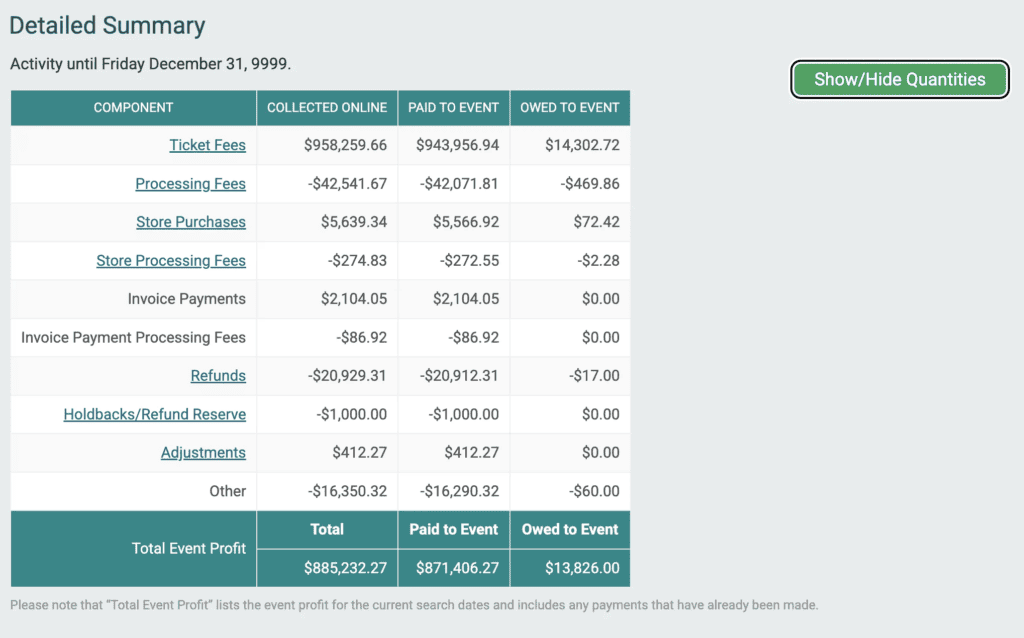
The Detailed Summary breaks your event into components: ticket fees, processing fees, discounts, store purchases, store processing fees, invoice payments, refunds, holdbacks, and adjustments.
Each one shows three numbers.
- Collected Online, what buyers paid
- Paid to Event, what already reached your bank
- Owed to Event, what is still outstanding
It totals into Total Event Profit. Turn on quantities and every dollar figure gets its unit count beside it.
Merchandise keeps its own lines and its own processing fees, so store revenue never disappears into ticket revenue
Open any deposit
Weekly payments by default. Daily payments are available upon request and approval. Some events hold funds back until a set date.
Every payout opens into its line items. Each ticket, discount, store item, donation, shipping charge, and fee inside it.
It works backward too. Take a transfer number off your bank statement and trace it to the purchases that funded it. Each transfer shows status, transfer type, and estimated bank arrival.
One deposit can cover many events. A rodeo, a concert, a wine event, and a festival can settle into a single transfer, and the funds transfer report breaks out how much came from each. No downloading four reports to reconcile one number.
Everything exports. Summary reports, jurisdiction detail, transaction line items, and per payout breakdowns, in CSV and Excel. You always have access to all of your data, including all of your financial reporting.
The payment account layer
When you create an event on TicketSignup for the first time, you create a payment account by telling us who to pay and how to do it. Once approved, you can attach the payment account to any event. In addition to the above per deposit reporting, the payment account dashboard lets you:
- Add financial access for a treasurer or bookkeeper without giving up your event dashboard
- Track your next upcoming deposit, and access any past payout reports
- Pull your 1099-K for any year
- Enter custom account codes that automatically append to every deposit report to seamlessly match your accounting system
So where is sales tax in all this?
Its own system, and its own demo.
There are more than 9,000 tax jurisdictions across the 45 states that charge sales tax. Rates differ by state, county, city, and special districts most people have never heard of. What you sell matters too, because an admission, a t-shirt, and a donation are not taxed the same way.
Since 2019, Marketplace Facilitator Laws moved that obligation from sellers to platforms. TicketSignup calculates, collects, files, and remits sales tax for your event, powered by Avalara.
- Sales tax is always on. No TicketSignup event quietly undercollects because somebody forgot a setting.
- Taxability is set per item. Festival passes map to admissions, apparel to clothing, posters to general goods. A single blended rate applied to a whole order is wrong for at least one line on it.
- Buyers see tax as tax. It appears on its own line at checkout, not folded into a fee.
- Nonprofit exemptions run state by state. Charitable, religious, educational, and governmental organizations may qualify in some states. Nonprofit status is not a blanket exemption anywhere. Each state shows the statute the exemption rests on, the item categories it covers, and the entity types that qualify.
- The reporting goes all the way down. Taxable, exempt, and remitted, for every jurisdiction you sold into, down to a few dollars owed to a single special district.
- Amusement and admission taxes are different. These fall outside marketplace facilitator laws in most places, so they are yours to define and yours to remit. TicketSignup applies the rules you set and gives you the reporting.
Simple, transparent pricing
40¢ per ticket
Plus 2.9% + 30¢ credit card processing. Free tickets are always free.
That is the whole price. There is no finance tier, no reporting add-on, and no charge for any of the following:
- Every report in this post
- Sales tax calculation, filing, and remittance
- Refunds
- Chargeback disputes
- Unlimited free email marketing
- Free event website
- The check-in app
- 100% US-based support
No contracts. No setup fees. No monthly subscriptions.
You choose who pays the fees: your event, the purchaser, or a 50/50 split. 94% of events pass them to purchasers.
Why finance teams trust TicketSignup
- PCI Level 1 payment facilitator
- 100% on time payments
- 100% US-based company
- 100% employee-owned, not VC-backed
- 3,000+ software releases per year
- 6 minutes of downtime since 2015
- Nearly $4 Billion processed for events as of August 2026
- More than 40,000 events per year
Frequently asked questions
- Who remits sales tax on my ticket sales? In marketplace states, TicketSignup does. Marketplace Facilitator Laws move collection and remittance to the platform, so TicketSignup files with every applicable jurisdiction and gives you the reports.
- Does TicketSignup charge for refunds? No. Refunds are free to issue, and each one is recorded automatically with its reason.
- Can I see which transactions are in a bank deposit? Yes. Every payout opens into its line items. For multi event operators, the funds transfer report also breaks the deposit out by event.
- How often does TicketSignup pay out? Weekly by default. Daily is available on request and approval, and you can hold funds until a set date.
- Do nonprofits automatically avoid sales tax? No. Nonprofit status is not a blanket exemption. Exemptions vary by state and item category, and they are claimed by certification tied to your payment account’s legal entity type.
- What about amusement or admission taxes? Those generally fall outside marketplace facilitator laws. You define the rate and what it applies to, TicketSignup applies it at checkout and reports on it, and remittance stays with your event.
- Can my accountant get access without full dashboard access? Yes. Financial access is added at the payment account level, which is also where you will find your 1099-K and custom account codes. They can view financials for your events without accessing other key tabs like Email or Websites.